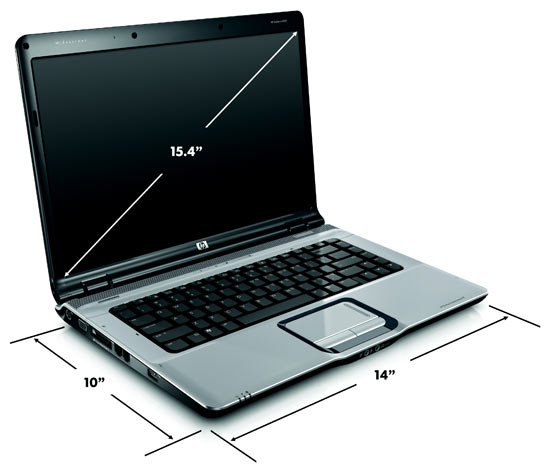
As usual, let me just start with the answer of the questions "Why, i had to look in to the details of DV6000?". The answer is that, my cousin wanted to get a laptop from US and he asked me some suggestions on it. With the help of some of the known expert's, i came to conclusion that HP is better than Sony Vaio. Well, the next step to find which model to buy. Somehow, after a very long search in web, i came to conclusion to suggest this model to my cousin.
And here goes the details/review of it.........
? ? ? ? I know your question..!!!! "Are you eligible to give a review on this..??"
The answer is, "Yes, i am." Because, i went to my friend with the same model and worked on it for some time. :-)
Hewlett Packard is one of the most prominent manufacturers of notebook computers today, and any trip to Best Buy will make that abundantly clear. Well, as of this writing, one of the notebook PCs they have on sale right now at Best Buy is the HP Pavilion DV6000. My friend picked one up a couple months ago for $870. So, this is certainly an affordable notebook PC. So, how does it perform in everyday use? Let’s check it out.
First, The Specs
In my eyes, the DV6000 is proof that PCs are affordable as hell today. These specs compare quite favorably to my desktop, all in a sub $800 notebook.
- Intel, dual core processor
- 3GB DDR2 memory
- 15.4″ WXGA High-Definition HP BrightView Widescreen Display (1280 x 800)
- 256MB NVIDIA(R) GeForce(R) Go 7200
- 250GB 5400RPM SATA Hard Drive
- LightScribe SuperMulti 8X DVD+/-RW with Double Layer Support
- 1.3 Megapixel Webcam with mic built into screen
- Altec Lansing speakers built in
- 3 USB ports, ExpressCard/54 Slot, Video Out, Integrated Consumer IR, 1 RJ-11, 1 RJ-45
- Windows Vista Home Premium
Now, when you look at this unit on HP’s website, you will see there are different spec configurations for this model. The above happens to be what I have in the unit I am typing this review on.
Use in the Real World
Now, I am not and never have been a big benchmark guy. If you are into computer reviews that load you up with benchmark specs, go to another site. What I am interested in is real world use. I bought this notebook to get work done, not win any contests. So, how does it perform in that regard?
One of the things that sold me on this laptop was the screen. The screen is gorgeous. It is wonderfully bright and clear, and provides a respectable 1280×800 resolution in a widescreen format. Yes, there certainly are notebooks with higher resolution. It really comes down to preference. While other units may give you higher resolution, some may find it hard to read on small screens. For me, I thought 1280×800 was a good resolution to use for a 15.4″ screen. My only complaint with the screen is that the glare is really bad when trying to use the unit outside. It gets so bad that it’s more like looking in a mirror than into a computer screen. Inside, however, the screen is beautiful.
The fact that this unit uses AMD rather than Intel means that it generates more heat. Intel processors just seem to run cooler in notebook computers. All benchmarks aside (because I don’t care), the performance of this notebook is quite good. It actually opens many apps much faster than my desktop PC, which is using an Intel Pentium Core Duo. So, I have no complaints about speed, however, yes, it does generate some heat.
The built-in Altec Lansing speakers will certainly not compare to the larger speakers you would plug in externally, but they do generate a nice sound for the size. For multimedia use, the speakers will get the job done.
The DV6000 comes with a thin, little remote control for use in controlling HP’s multimedia player. HP is using a proprietary multimedia player for playing DVDs called QuickPlay. It ties in with the remote control as well as the QuickPlay buttons on top of the notebook. The player is decent, but many times I found myself simply wanting to use Windows Media Player rather than the QuickPlay popping up full screen. Also, the fact that it is tied into the QuickPlay buttons can be a little annoying at times. Several times I have rested my fingers on the top of the notebook and accidently pressed the DVD button and launched Quickplay. No matter what I’m doing, that interrupts the workflow badly.
For digital photography, I find the built-in card reader really convenient. Since my Canon camera uses SD cards, I can just pull the card out and plug it directly into the notebook to pull images onto the computer. This means I don’t have to track down the USB cable that came with the camera. Nice and easy.
But, It Uses Vista
Like almost every PC on the market today, this unit comes with Windows Vista. Now, on my desktop, I can rattle off a bunch of annoyances with Windows Vista. Many of us that follow technology all the time have many complaints about Vista, and I still stand by the fact that Vista was NOT ready for market upon it’s release. But, judging by the DV6000, Vista does seem to run better on completely proprietary machines. I do have occasional annoyances with Vista on the DV6000.. For example, sometimes it will lose it’s screen resolution settings when coming out of sleep mode. This is an issue with Vista and will be fixed. Other than that, though, Vista runs significantly better on this notebook machine than it does on my desktop. No complaints, really.
Like all pre-built computers, it comes with some pre-installed software. It comes with a 60-day trial installation of Office 2007. Since I don’t care to fork out several hundred dollars just for a ribbon interface, I opted to install OpenOffice, which gets me 95% there for free. The DV6000 comes with some other pre-installed crap, much of it I ended up removing from the computer.
Note to HP
I am pretty happy with the DV6000, but I need to mention a few annoyances for the benefit of HP. When I was at Gnomedex recently, HP was there and we had a lengthy discussion about notebook design. HP does indeed listen to feedback, so here is mine on the DV6000.
- The QuickPlay buttons at the top are too easy to hit by accident, as I mentioned above. Some obvious way to control or disable those buttons would be nice.
- We need some kind of anti-glare surface to the screen. It’s practically unusable in sunlight. I realize that the surface it does have plays a role in the crystal clear colors I see indoors, but something has to be done to make this thing more usable in sunlight.
- AMD is good for economics, but it generates a lot more heat.
Conclusions
The HP Pavilion DV6000 is a really nice, solid notebook computer and you really can’t go wrong with this unit. The price tag makes it very affordable. The unit sports a nice, sleek design and good all-around performance. It also offers a solid balance of features which really makes this entertainment notebook usable as a desktop replacement. In fact, I enjoy it so much I find myself spending more time working on the DV6000 now than I do my main desktop computer.
So, despite a few annoyances, you really can’t go wrong with the DV6000 if you are looking for a solid, balanced work notebook without spending too much money.
Check out the following pics: